Napkin ring#
This tutorial follows python/demo/demo_napkin_ring.py. A shape with sharp
edges is given as a level set made of level sets: CutCells cuts with its
smooth level sets, so the edges are exact, and the faces of its surface can
be selected one by one.
Geometry#
Drill a cylindrical hole of radius \(a\) through the centre of a ball of radius \(R\). What is left is a napkin ring of height \(h=2\sqrt{R^2-a^2}\), whose volume depends on \(h\) alone:
Its surface has two faces, the sphere zone and the wall of the hole, of areas \(2\pi R h\) and \(2\pi a h\), which meet in two circles of radius \(a\). The demo uses \(R=0.8\) and \(a=0.45\).
Why a Level Set Made of Level Sets#
A single level set for the ring, such as \(\max(\phi_\text{ball},-\phi_\text{cyl})\), has a kink along the rims. Its interpolant rounds the kink off, and the error there decays slowly. The smooth level sets themselves have no kink: given both, CutCells finds the rims as the curves where both vanish.
A LevelSetFunction takes the level sets it is made of and its inside, a
condition on them:
ball = cutcells.analytic_sphere([0.0, 0.0, 0.0], BALL_RADIUS, name="ball")
cyl = cutcells.create_level_set(mesh, cylinder, degree=3, name="cyl")
ring = cutcells.LevelSetFunction(level_sets=[ball, cyl], inside=(ball < 0) & (cyl > 0), name="ring")

result = cutcells.cut(mesh, ring)
result.level_set_names   # ['ring.ball', 'ring.cyl']
result.insides           # {'ring': 'ball < 0 and cyl > 0'}
The ball is exact and the cylinder a P3 interpolant: the parts of one level set made of level sets may be of different kinds.
Selecting the Ring and its Faces#
The ring is selected like any level set. ring < 0 is its inside,
ring == 0 its surface, and part.on(...) keeps the faces on the level sets
named:
solid = result[ring < 0]                  # ball < 0 and cyl > 0
surface = result[ring == 0]
zone = surface.on("ball")                 # the sphere zone
hole = surface.on("cyl")                  # the wall of the hole
rims = result[(ball == 0) & (cyl == 0)]   # the two circles
Conditions on the level sets it is made of select by their full names:
result[cyl < 0] is result["ring.cyl < 0"].
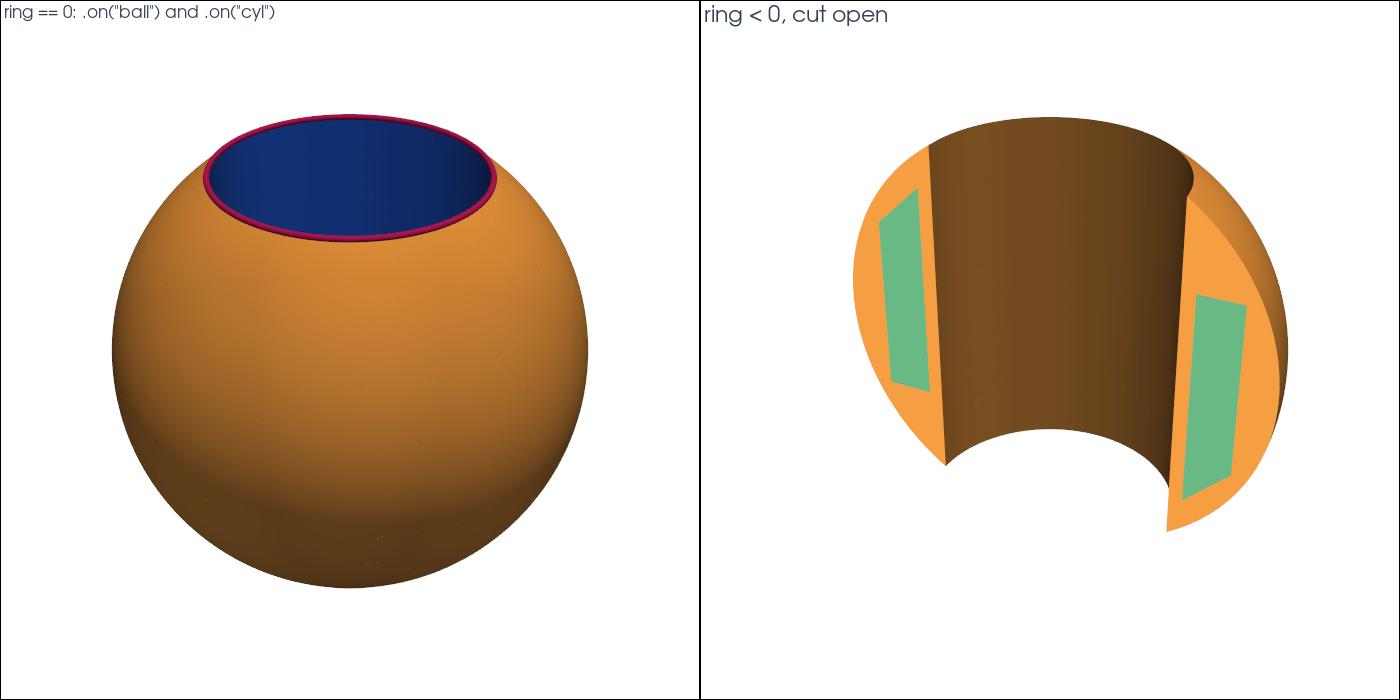
Results#
level sets: ['ring.ball', 'ring.cyl'], insides: {'ring': 'ball < 0 and cyl > 0'}
cut cells: 2832, ring height h = 1.322876
    part  dim         measure           exact      error
    ring    3    1.2121527672    1.2121481286   4.64e-06
 surface    2   10.3898449025   10.3898411026   3.80e-06
    zone    2    6.6495067673    6.6494983057   8.46e-06
    hole    2    3.7403381352    3.7403427969   4.66e-06
    rims    1    5.6548528308    5.6548667765   1.39e-05
The errors are those of the P3 cylinder. Its error at the rims, where it
meets the ball, shifts area between the zone and the hole, so that their
errors partly cancel on the whole surface. With --degree 4 the volume error
is 4.7e-7 and the rim error 1.6e-6, with --degree 2 9.6e-5 and 6.2e-4.
Run the Demo#
python python/demo/demo_napkin_ring.py
python python/demo/demo_napkin_ring.py --degree 4 --no-plot
Options: --n grid points per side, --degree of the cylinder, --order of
the quadrature, --output-dir for the VTU files, --no-plot and
--screenshot file.png.