Ball and plane#
This tutorial follows python/demo/demo_sphere_plane.py. Two level sets cut
the mesh at once, and conditions on both select parts of every dimension: a
volume, two surfaces and a curve.
Geometry#
A ball of radius \(R=0.8\) about the origin and the plane \(z=z_0\), \(z_0=0.3\), give the level sets
The plane crosses the ball in a disk of radius \(a=\sqrt{R^2-z_0^2}\). The exact measures of the parts are
Two Level Sets#
The ball is analytic and the plane a P1 level set; cut takes them as a
list:
mesh = cutcells.box_mesh(-1.0, -1.0, -1.0, 1.0, 1.0, 1.0, n, n, n, cell_type="tetrahedron")
ball = cutcells.analytic_sphere([0.0, 0.0, 0.0], RADIUS, name="ball")
plane = cutcells.create_level_set(mesh, lambda X: X[2] - HEIGHT, degree=1, name="plane")
result = cutcells.cut(mesh, [ball, plane])
result.level_set_names is ['ball', 'plane'], and result.domains holds,
per level set and cell, whether the cell is inside, cut or outside.
Selections of Every Dimension#
& combines conditions; each comparison needs its parentheses. The dimension
of a part follows from its equality clauses: none gives a volume, one a
surface, two a curve.
below = result[(ball < 0) & (plane < 0)]      # dim 3
cap = result[(ball == 0) & (plane < 0)]       # dim 2
disk = result[(plane == 0) & (ball < 0)]      # dim 2
circle = result[(ball == 0) & (plane == 0)]   # dim 1

length = circle.quadrature(order=4).weights.sum()
The same selections as strings read "ball < 0 and plane < 0",
"ball = 0 and plane = 0"; str(condition) writes a condition as its
string. | gives unions, such as (ball < 0) | (plane < 0). See
Cut results and selections.
Views#
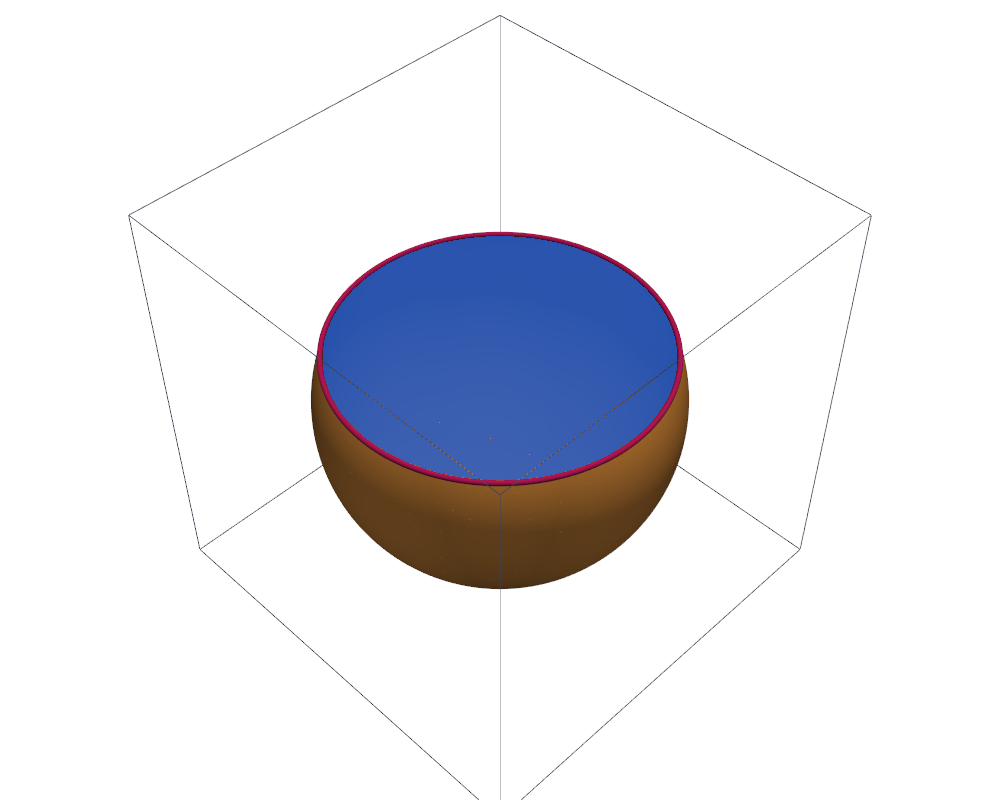
Every part has a visualisation mesh; the curve is drawn as a tube:
def surface(part, subdivision=3):
    mode = "full" if part.dim == 3 else "cut_only"
    grid = cutcells.to_pyvista(part.visualization_mesh(mode=mode, degree=3))
    return grid.extract_surface(nonlinear_subdivision=subdivision, algorithm="dataset_surface")

plotter.add_mesh(surface(cap), color="#f59e42", smooth_shading=True)
plotter.add_mesh(surface(disk), color="#2563eb", opacity=0.85)
plotter.add_mesh(surface(circle, 4).tube(radius=0.012), color="#be185d")
Results#
level sets: ['ball', 'plane'], cut cells: 2582
                    part                     selection  dim           measure      error
    ball below the plane        ball < 0 and plane < 0    3    1.647241747976   5.61e-11
  sphere below the plane        ball = 0 and plane < 0    2    5.529203072306   1.99e-09
                    disk        plane = 0 and ball < 0    2    1.727875966604   7.13e-09
                  circle        ball = 0 and plane = 0    1    4.659734941575   4.65e-09
Run the Demo#
python python/demo/demo_sphere_plane.py
Options: --n grid points per side, --order of the quadrature,
--output-dir for the VTU files of the four parts, --no-plot and
--screenshot file.png.